Your Games Are Crashing And Your PC Is Not The Problem
Windows 11's August update is crashing games and breaking Windows Hello. Here's the actual fix for KB5121003 game crashes, and why rolling it back is a bad idea.
By The FixKon Team
You sat down to play. Everything was fine last week. Now your game just closes. No error, no warning, no nothing. Sometimes the whole PC restarts like it's throwing a tantrum.
And your brain immediately goes: my rig is cooked.
It's not. Windows did this.
The update is KB5121003. Dropped August 11th. If you're on Windows 11 24H2 or 25H2 you got it whether you wanted it or not. Builds 26100.9168 and 26200.9168 if you wanna check. And on August 20th, nine whole days later, Microsoft finally added a line to its own release health page admitting that "certain games" are becoming unresponsive.
Nine days. People were losing their minds on Reddit the entire time.
Anyway. Here's what actually broke and how to fix it in about a minute, because the advice going around right now is genuinely bad and I'll explain why.
What KB5121003 Broke (Besides Your Games)
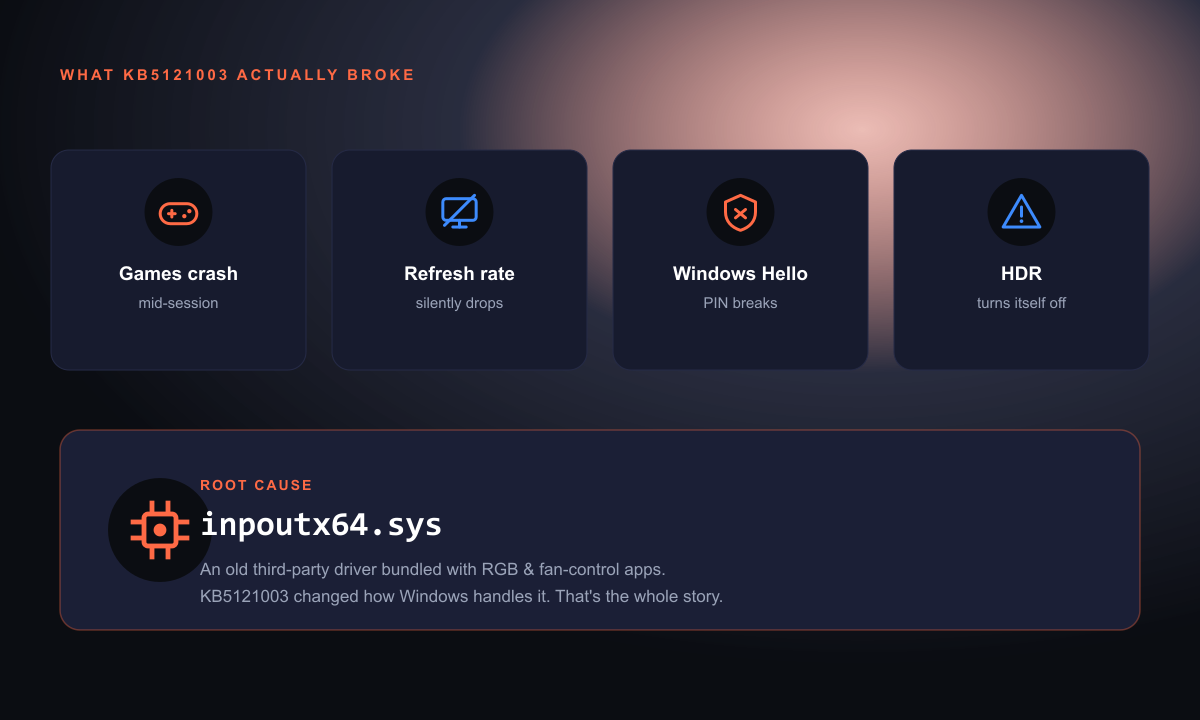
Game crashes are the headline. ARC Raiders, The Finals, and MARVEL Tōkon: Fighting Souls are the confirmed casualties. You'll get EXCEPTION_ACCESS_VIOLATION, or "Hang detected on GameThread," or the game just evaporates. One guy documented six crashes back to back. Some people are getting full system reboots out of it.
But it's not just gaming. Same update, same week, people are reporting:
- HDR straight up dies. It's on, it looks flat, or it just turns itself off.
- Your refresh rate silently drops. You bought a 165Hz monitor. Windows put you on 60. You can feel it but you can't explain it, so you assume your GPU is dying.
- Black screens on wake or boot for some setups.
- Windows Hello PIN gets corrupted. You reboot, PIN doesn't work. You re-enroll it. You reboot. Doesn't work again. Every. Single. Time.
That last one is the most unhinged because it doesn't read as an update problem. It reads as your PC being broken.
The Real Culprit: A Driver Named inpoutx64.sys
Embark Studios, the devs behind The Finals and ARC Raiders, actually did the work and found it. The whole thing traces back to a kernel driver called inpoutx64.sys.
Plain English: inpoutx64.sys is an ancient third-party driver that lets software poke directly at low-level hardware ports. It's not malware, chill. It ships bundled with a ton of normal stuff. RGB lighting apps. Fan control software. Overclocking tools. Motherboard utilities from your board's manufacturer. Random monitoring apps.
You did not install this on purpose. Something else snuck it onto your machine and you never knew.
KB5121003 changed how Windows treats that driver. Old driver, new rules, instant crash. That's the entire story.
Which is why reinstalling your game does nothing. Why updating your GPU driver does nothing. Why running a virus scan does nothing. You're looking in the wrong place.
How To Fix KB5121003 Game Crashes (Takes 60 Seconds)
Embark posted the workaround and it's been passed around all week. Here:
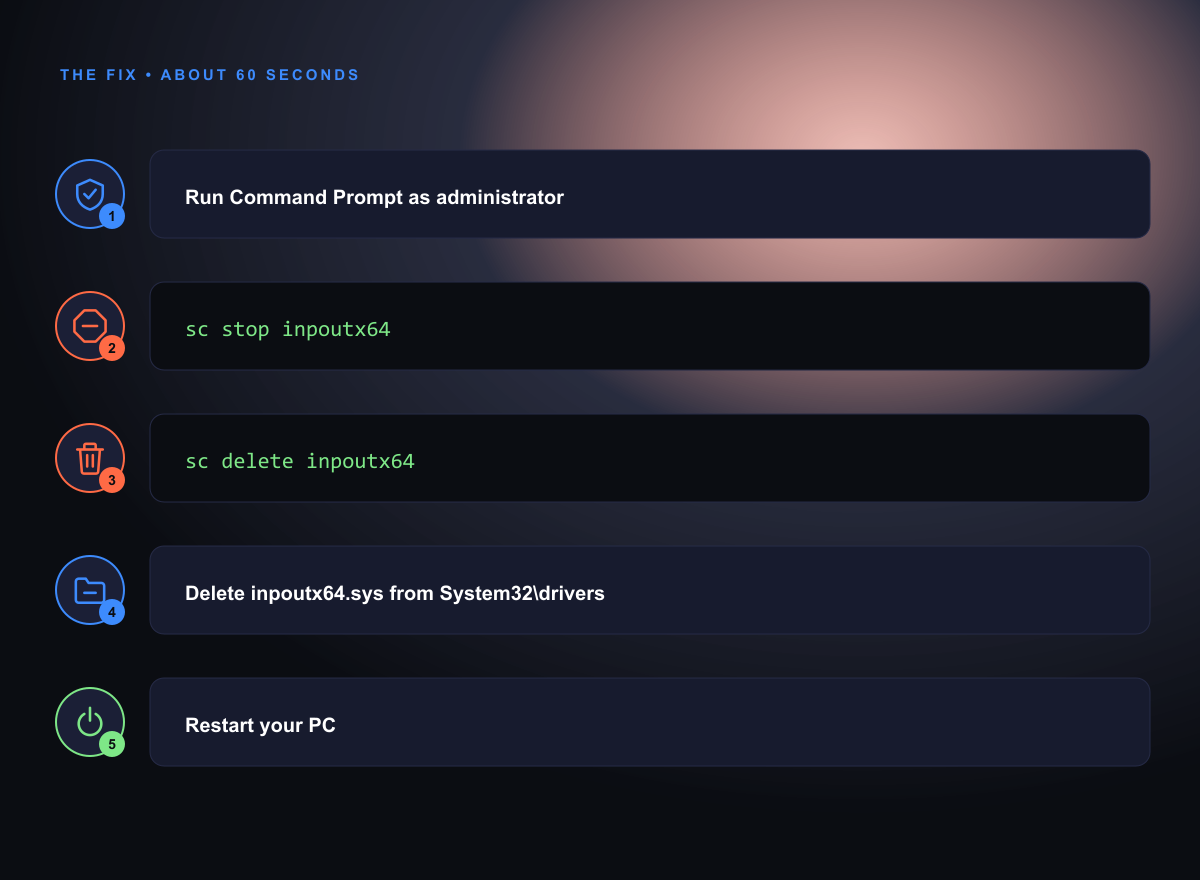
- Hit Start, type
cmd, right-click Command Prompt, pick Run as administrator. - Type
sc stop inpoutx64and hit Enter. - Type
sc delete inpoutx64and hit Enter. - Open File Explorer, go to
C:\Windows\System32\drivers\, findinpoutx64.sys, delete it. - Restart.
If step 2 says the service doesn't exist? Good, this isn't your problem. Your crashes are something else and you can stop reading this section.
Not comfortable deleting system files? Fair. Just do step 2 and stop there. Stopping the service without deleting it is fully reversible and it's enough to test the theory. Crashes stop, you found your guy.
Heads up though: whatever app dragged that driver onto your PC might reinstall it next time it launches or updates. So if the crashes come back in a week, that's why. Figure out which RGB or fan tool it is and either update it or send it to the shadow realm.
Please Do Not Uninstall KB5121003
This is the advice all over YouTube right now and it's actually dangerous.
KB5121003 wasn't a small patch. It closed 421 security vulnerabilities. One of them, CVE-2026-68820, is a use-after-free bug in Windows' networking driver (AFD.sys) that lets a low-privilege program escalate itself to SYSTEM. SYSTEM means full control. Game over, that's your whole machine.
And it's not theoretical. North Korean operators were already exploiting it in the wild as part of the Operation Dream Job campaign, using it to drop kernel-level rootkits. Microsoft told people to install this update within three days for a reason.
So when you uninstall KB5121003 to fix your game crashes, you're reopening 421 holes, including one attackers are actively walking through, to avoid deleting one obsolete driver file.
That's not a trade. That's a self-report. Delete the driver instead.
If you're genuinely stuck (crashes so bad the PC is unusable, driver fix didn't do anything) then fine, rolling back is a valid emergency move. Settings > Windows Update > Update history > Uninstall updates. But treat it like a temporary bandaid and reinstall the second there's a real fix.
Other Windows 11 Settings Worth Checking While You're Here
You've already got the hood up. A bunch of "my PC got slow after the update" complaints are actually just these:
Your refresh rate. Settings > System > Display > Advanced display. Look at "Choose a refresh rate." If your 165Hz monitor is sitting at 60, there's your mystery sluggishness. Fix it and feel your whole desktop wake up.
HDR. Settings > System > Display > HDR. Toggle off, reboot, toggle back on. Works for most people.
Startup apps. Task Manager (Ctrl+Shift+Esc) > Startup apps, sort by startup impact. Be honest with yourself about how much of that list you actually use. Half of it is launcher updaters and RGB software you opened once in 2023 and never again. Bonus: that's the exact category of software that smuggled inpoutx64.sys onto your PC in the first place. Two birds.
GPU drivers. NVIDIA and AMD both push hotfix drivers after Microsoft ships a messy patch. Worth a look.
Game Mode. Settings > Gaming > Game Mode. It's on by default but Windows updates have flipped it before. Trust nothing.
Why Your PC "Randomly" Gets Slow
Real talk: every month there's a Patch Tuesday, and every few months one of them breaks something you can actually feel. Your PC gets slower or crashier, there's no obvious reason, so you assume it's age. Then you start browsing new builds at 1am.
Most of the time it's not age. It's a driver conflict. A setting that quietly reset itself. A background process that shouldn't exist. A pile of background launchers that grew to 30 items while you weren't looking. Boring stuff. Fixable stuff. Stuff that takes minutes, not money.
That's the whole reason FixKon exists. It watches the things that actually tank Windows performance (junk buildup, background processes, settings that drifted) and tells you in normal human words what changed. Hold the shortcut and ask "why is my PC slow" or point it at a crash screen and it reads the error and explains it, instead of you typing the error code into a search bar at midnight.
You can download FixKon free. The free tier does cleanup and disk analysis, no card, no countdown timer.
But even if you never touch it: delete the driver, keep the security patch, go check your refresh rate. You'll be fine.
FAQ
Should I uninstall KB5121003 if my games keep crashing?
No, not first. KB5121003 patched 421 security flaws including CVE-2026-68820, a zero-day attackers are actively using to get SYSTEM-level access. Delete the inpoutx64.sys driver instead, which fixes the crashes without giving the security patches back. Only roll the update back if your PC is genuinely unusable and the driver fix didn't help.
What is inpoutx64.sys and is it safe to delete?
It's an old third-party kernel driver that gives software direct access to hardware ports. It comes bundled with RGB lighting apps, fan controllers, overclocking tools, and motherboard utilities. It's not malware and deleting it is safe for basically everyone. Worst case, one hardware-tweaking app loses a feature until its devs push an update.
Why is my Windows Hello PIN not working after the August update?
KB5121003 is corrupting Windows Hello PIN enrollment on some machines, so your PIN dies after every reboot. Re-enrolling under Settings > Accounts > Sign-in options works but usually doesn't stick. Until Microsoft patches it, switching to a password or fingerprint is the move.